Week starting 23rd November: Good availability with most voices this weekStudios reopen 9am Wednesday 25th NovemberNeed help choosing a voice? Send us your brief
Telephone Audio Formats: Clear Recordings for Your Phone System
WAV, μ-law, A-law or VOX? We prepare IVR and on-hold recordings to your phone system’s specification, with clarity processing tailored for telephone use.
VT
Voiceovers Team
Updated
The right file for your telephone system
Your phone provider has asked for an “8 kHz mono WAV” or a “μ-law file”. You have a welcome message to record, but the audio specification may be unfamiliar. We can take care of both: a professional voice recording and the correctly prepared files for your telephone system.
We supply telephone prompts, IVR menus, voicemail greetings and on-hold messages in a range of formats. We also use telephone-specific clarity filters, shaping the sound so speech stays as clear as possible within the limits of the required format. Send us your provider’s specification and we’ll confirm the delivery settings before production.
Telephone audio formats we can supply
Our telephone export options include the following. The correct choice depends on your provider’s requirements; these formats are not interchangeable.
Our VOX files are supplied as raw, headerless audio. If your system requires a different specification, send it over so we can confirm what is needed.
Why “a WAV file” is only part of the specification
WAV describes the file container. The audio inside it can use different encoding, sample rates and channel settings. A stereo studio WAV and an 8 kHz mono μ-law WAV may share the same extension, but your phone system may accept only one of them.
8 kHz and 8-bit mean different things. The sample rate describes how often sound is sampled; bit depth describes the resolution of each sample in PCM audio. “8 kHz” on its own does not tell us which encoding your system needs.
For example, 3CX’s audio import guidance specifies mono, 8 kHz, 16-bit PCM WAV. Other systems may request μ-law, A-law or VOX. We work from your provider’s current requirements rather than guessing from the filename.
Clarity filters designed for telephone use
A voice that sounds full and rich on studio speakers can become less distinct through a telephone connection. Our telephone production includes clarity processing tailored to the recording and its intended use.
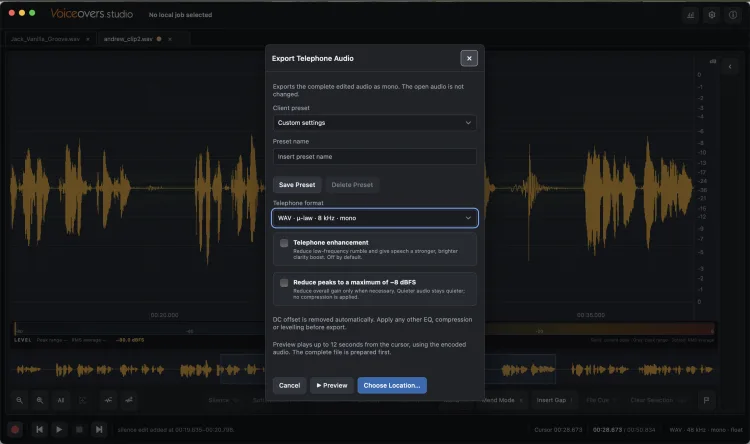
We use filters to reduce unnecessary low-frequency rumble and emphasise the parts of speech that help words sound distinct. Our proprietary audio editor gives us dedicated telephone export and clarity controls, allowing us to prepare the voice for the required delivery format.
We also check levels in the converted audio. For on-hold productions, we balance the music around the voice so the message remains the focus. Clear delivery, sensible pacing and a good script matter alongside the processing.
The aim is an intelligible, comfortable listen. Processing cannot recover detail that a restricted format cannot carry, or fix a poor telephone connection.
Telephone export controls in our audio editor, including format selection and optional clarity enhancement. We choose the settings to suit each recording and phone system.
Why telephone audio sounds different
An 8 kHz telephone file carries a narrower range of sound than a studio master. Some loss of brightness and detail is expected, particularly in music. Supplying a higher-resolution file will not necessarily improve the result if the system rejects it or converts it again.
We prepare the telephone version from the clean master recording and can audition the encoded output. Once your provider has uploaded the messages, we recommend making a test call through the actual system: the phone platform, call connection and handset all affect what callers hear.
What to send us before recording
You do not need to become an audio engineer. Forward the upload instructions from your telephone provider, or send a screenshot of its audio requirements. Useful details include:
Your telephone platform and provider.
The file type, encoding, sample rate and mono or stereo requirement.
Any file-size, duration or filename restrictions.
Your script and the separate prompts or messages required.
Whether each message needs voice only or a voice-and-music mix.
If you are unsure, ask your provider for its “audio file specification for custom prompts and on-hold messages”. That gives us a practical starting point and helps avoid files being rejected at upload.